
Vallar
-
SOE-TEAM
S10
-
-NoRulz-
S10
-
Q
S10
-
Old-Course-School
S10
-
TheLegends
S10
-
3-Lions
S10
-
Cordilleran0S
S10
-
TheArkangesTigers
S10
-
xFEARx
S10
-
Les_Virtual_Golfeurs
S10

| Subject |
[Update] Mulligan Pass |
|||||||||||||||||||||||
|---|---|---|---|---|---|---|---|---|---|---|---|---|---|---|---|---|---|---|---|---|---|---|---|---|
| Date | Jun 23, 2026 | Views | 774 | |||||||||||||||||||||
Hello SOmmunity!We would like to introduce one of the new features arriving with the June 2026 update.
Please review the details below to learn more about the Mulligan Pass system.
* The descriptions and values listed below are based on the initial update version and may differ from the current in-game content. The information provided is subject to change.
◈ June Update Details
♥ Mulligan Pass
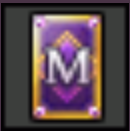
Have you ever found yourself facing difficult weather conditions or unfavorable winds and wished you could simply move on to the next hole?
The new Mulligan Pass system provides an additional strategic option during your round, allowing you to skip a hole under certain conditions and continue your game more smoothly.
When used, a Mulligan Pass allows you to finish the current hole with a predetermined score and immediately proceed to the next hole.
1. Overview
Unlike the existing Mulligan Card, which cancels your previous shot and allows you to replay it, the Mulligan Pass instantly ends the current hole and moves you directly to the next one.
* The Mulligan Pass is available in two types: Mulligan Pass and Mulligan Pass+.
2. How to Use
* Both Mulligan Pass and Mulligan Pass+ can be used in the same manner.
- Currently, Mulligan Pass is only available in Stroke and Swift Stroke Mode.
① Using the [HOLE SKIP] button before taking your tee shot
* The [HOLE SKIP] button will not appear in the following situations:
- When you do not have a Mulligan Pass item in your inventory.
- After a tee shot has already been taken.
- When the previous hole was skipped using a Mulligan Pass and another pass cannot be used.
② During a round, right-click a Mulligan Pass item in your inventory and use it when desired.
③ During a round, register a Mulligan Pass in a quick slot and use it when needed.
* Mulligan Pass cannot be used while a shot is in progress.
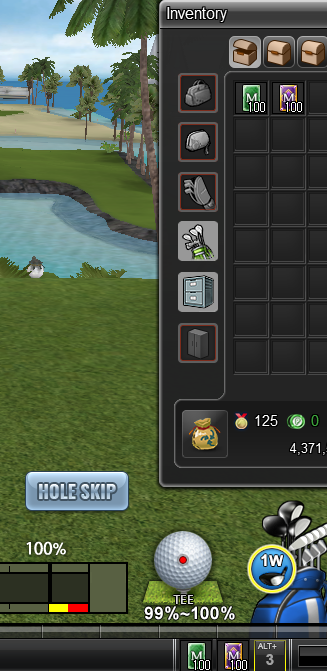
① When you click the [HOLE SKIP] button at the tee, you can directly select the Mulligan Pass item you wish to use.
After selecting the desired item, click the [OK] button to proceed.
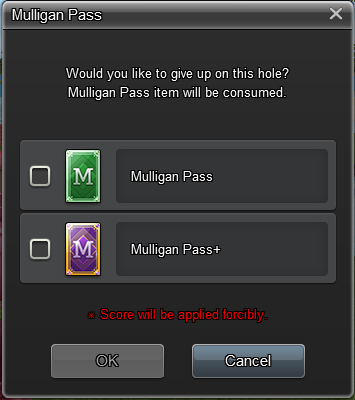
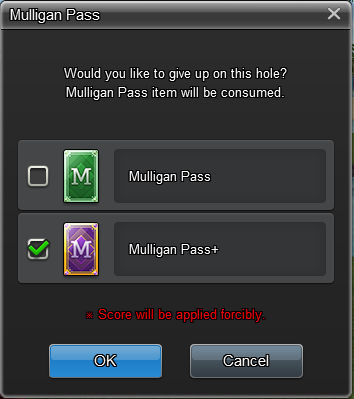
② When using a Mulligan Pass directly from your inventory, the selected item will be highlighted and can be applied by clicking the [OK] button.
3. Conditions When Use Is Not Possible
* Mulligan Pass cannot be used in the following situations:
① When the previous hole was already skipped using a Mulligan Pass.
* Consecutive hole skips are not permitted.
② When it is not your turn during the round.
* Mulligan Pass can only be used during your own turn.
We hope the Mulligan Pass adds a new layer of strategy and flexibility to your rounds.
Choose the right moment, make your decision, and enjoy a more comfortable golfing experience.
Your Shot Online Team |
||||||||||||||||||||||||
-
NOTICE
07OCT
2026 -
NOTICE
27SEP
2026 -
NOTICE
22SEP
2026 -
NOTICE
22SEP
2026 -
NOTICE
22SEP
2026 -
NOTICE
21SEP
2026 -
NOTICE
20SEP
2026 -
NOTICE
27AUG
2026 -
NOTICE
25AUG
2026 -
NOTICE
23AUG
2026

