
Vallar
-
SOE-TEAM
S10
-
-NoRulz-
S10
-
Q
S10
-
Old-Course-School
S10
-
TheLegends
S10
-
3-Lions
S10
-
Cordilleran0S
S10
-
TheArkangesTigers
S10
-
xFEARx
S10
-
Les_Virtual_Golfeurs
S10

| Subject |
[Update] Legend Club Potential System |
||||||||||||||||||||||||||||||||
|---|---|---|---|---|---|---|---|---|---|---|---|---|---|---|---|---|---|---|---|---|---|---|---|---|---|---|---|---|---|---|---|---|---|
| Date | Jun 23, 2026 | Views | 1,009 | ||||||||||||||||||||||||||||||
Hello, SOmmunity!
We're excited to introduce another major enhancement to the Legend equipment system as part of the June 2026 update.
Please review the details below to learn more about the new Legend Club Potential System.
* The descriptions and values listed below are based on the initial update version and may differ from the current in-game content. The information provided is subject to change.
◈ June Update Details
Following the Potential expansion system for Advanced Legend Clothes introduced in December 2025, we are now introducing the Legend Club Potential System.
This update focuses on Drivers, Woods, and Iron Sets. Potential support for the remaining club categories will be added in future updates.
♥ Legend Club Potential System
Legend Club Potential is a system that allows the EXP cap of Legend-grade club options to be expanded.
Like the Advanced Legend Clothes Potential System, Potential Expansion increases the maximum possible EXP value that an option can obtain. Expanding Potential does not immediately increase an option's EXP value. Instead, after expanding Potential, option changes may generate EXP values within the newly expanded range.
* Options with expanded Potential can only be changed through the [Legend Club Potential Expansion] menu. When changing options, exclusive materials can be used to lock course and score-related options so they remain unchanged.
For detailed information on Potential Expansion and Option Changes, please refer to the sections below.
1. Legend Club Potential Expansion
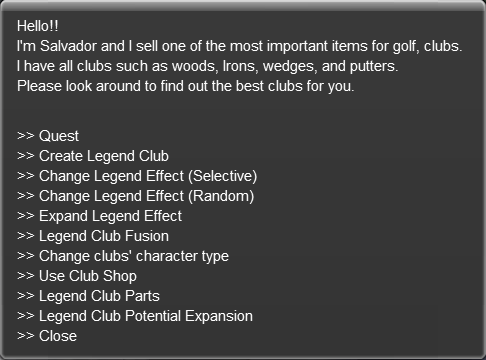
* Legend Club Potential Expansion is available through NPC Salvardor via the [Legend Club Potential Expansion] menu.
* Potential can be expanded on clubs that have two or more Legend-grade Legend Options.
* NG is consumed when attempting Potential Expansion.
* Expansion costs increase based on the number of attempts made on the selected option. Attempt counts are retained even if the club is traded or transferred to another character.
* Potential values can be expanded up to a maximum of 13%.
* If the result is lower than the current Potential value, the Potential value will remain unchanged.
* Expanded Potential values remain on the club even if it is traded or transferred to another character.
- Potential Expansion does not directly increase an option's EXP value. An option change must be performed for EXP values within the expanded range to appear.
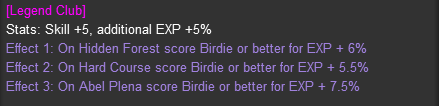
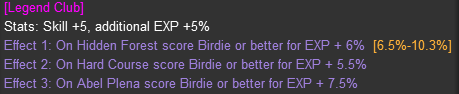
◆ Potential Display
* Potential consists of the minimum and maximum values at which an EXP option can appear. Expanded Potential is displayed based on the maximum value.
(Example: Option appearance range (8.5% – 11.5%) / Displayed Potential value (11.5%))
* After Potential Expansion, the expanded Potential value will be displayed in the club effects.
[Before Potential Expansion]
[After Potential Expansion]
🔹 How to Expand Legend Club Potential
① Click NPC Salvardor and select the [Legend Club Potential Expansion] menu.
② Register the Legend Club whose Potential you wish to expand, then click the [Expand] button for the option you want to enhance.
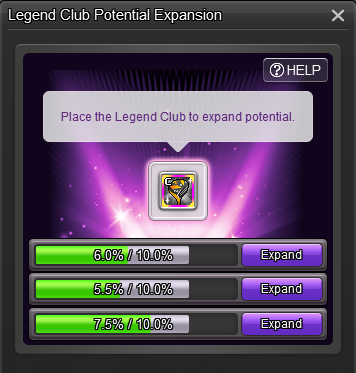
③ After confirming the selected option, click the [Expand] button.
If you set a target Potential value, automatic repeated expansion can be used until the desired value is reached.
For details, please refer to the [Legend Club Potential Auto-Repeat Expansion Method] section below.
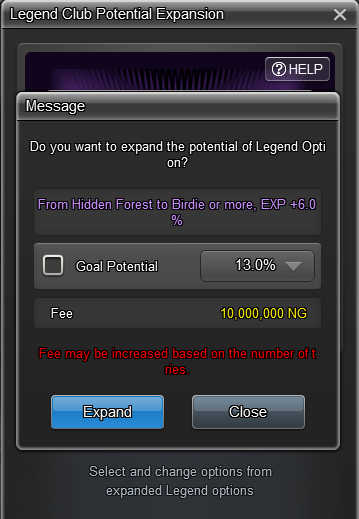
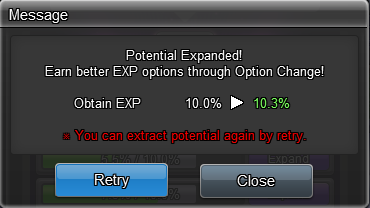
④ Once Potential Expansion is complete, you can review the updated Potential value.
Selecting the [Retry] button allows another attempt.
If the new Potential value is lower than the previous value, the previous value will be retained.
🔹 Legend Club Potential Auto-Repeat Expansion Method
① In the Potential Expansion screen, select the target Potential and your desired Potential value.
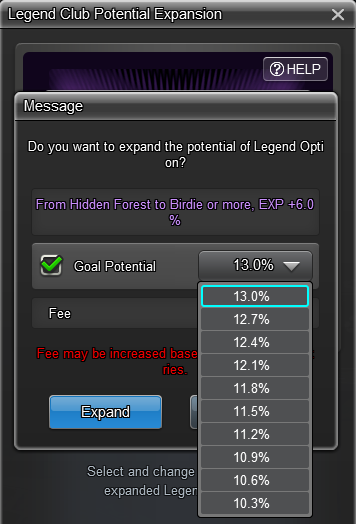
② After confirming the target Potential, click the [Yes] button to automatically repeat Potential Expansion until the selected value is reached.
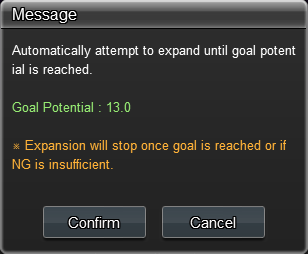
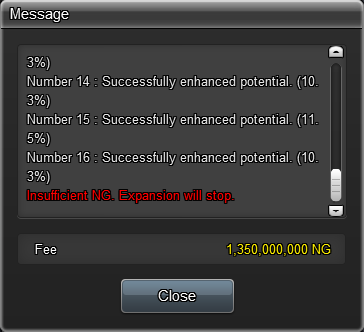
③ While automatic expansion is in progress, the results of each attempt will be displayed in the message window.
The process will automatically stop when:
* The target Potential value or a higher value is reached.
* Available NG is insufficient for the next attempt.
If you click the [Close] button during the process, automatic expansion will stop and the highest Potential value achieved up to that point will be applied.
2. Option Change After Legend Club Potential Expansion
* Options of Legend Clubs with expanded Potential can be changed through NPC Salvardor's [Legend Club Potential Expansion] menu.
* A Legend Change Hammer is required to perform an option change.
* Course and score-related options can be locked during option changes.
* When option locks are applied, Ancient Red Seal Stone Pouch or Ancient Blue Seal Stone Pouch will be required depending on the option type.
* Ancient Red Seal Stone Pouch and Ancient Blue Seal Stone Pouch are material items stored in the Material Pouch and can be obtained through events or purchased from the Item Mall.
* These items are also used when changing Advanced Legend Clothes options.
🔹 Option Change After Potential Expansion
① Click NPC Salvardor and select the [Legend Club Potential Expansion] menu.
Register the club whose option you wish to change. Selecting an option will open the option-change screen, where you can review the current option details and the range of EXP values that may appear.
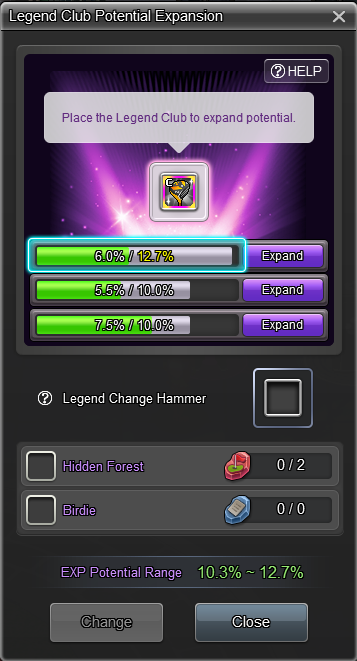
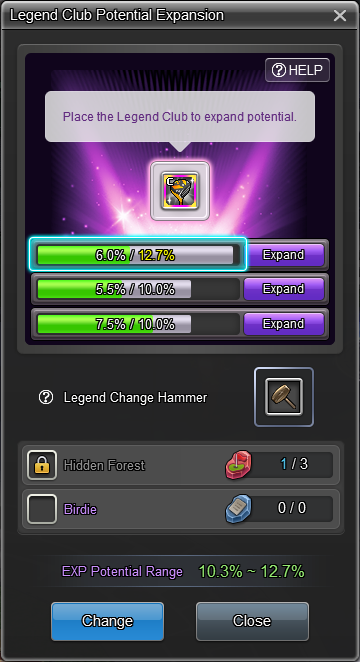
② If you would like to keep your course or score-related options unchanged, apply the lock settings as shown below, register a Legend Change Hammer, and click the [Change] button.
③ Once the option change is complete, you can compare the original option with the newly generated option.
Select the option you wish to keep and click the [Change] button to finalize your selection.
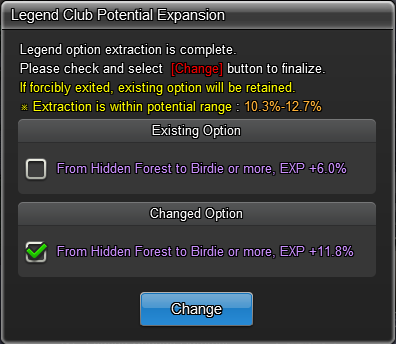
* If the client closes before an option is selected and confirmed, the original option will be retained.
We hope you enjoy discovering new possibilities for your Legend Clubs through the Legend Club Potential System.
Your Shot Online Team |
|||||||||||||||||||||||||||||||||
-
NOTICE
07OCT
2026 -
NOTICE
27SEP
2026 -
NOTICE
22SEP
2026 -
NOTICE
22SEP
2026 -
NOTICE
22SEP
2026 -
NOTICE
21SEP
2026 -
NOTICE
20SEP
2026 -
NOTICE
27AUG
2026 -
NOTICE
25AUG
2026 -
NOTICE
23AUG
2026

