
Vallar
-
SOE-TEAM
S10
-
-NoRulz-
S10
-
Q
S10
-
Old-Course-School
S10
-
TheLegends
S10
-
3-Lions
S10
-
Cordilleran0S
S10
-
TheArkangesTigers
S10
-
xFEARx
S10
-
Les_Virtual_Golfeurs
S10

| Subject |
[Update] Choice Challenge System |
||||||||||||||||||||||||||||||||||||||||||||||||||||||||
|---|---|---|---|---|---|---|---|---|---|---|---|---|---|---|---|---|---|---|---|---|---|---|---|---|---|---|---|---|---|---|---|---|---|---|---|---|---|---|---|---|---|---|---|---|---|---|---|---|---|---|---|---|---|---|---|---|---|
| Date | Dec 09, 2025 | Views | 3,958 | ||||||||||||||||||||||||||||||||||||||||||||||||||||||
Dear SOmmunity,
We would like to give you a closer look at the new content coming with the December maintenance.
Please read this announcement carefully to make sure you have all the information.
✅ Choice Challenge
- Choice Challenge is a system where you select mission cards presented during a round and complete varying conditions based on your card choices to earn points.
- Choice Challenge operates on a seasonal basis. The first season will be a Pre-Season, and some details may be subject to change later.
◈ Choice Challenge Details
- Choice Challenge is a 9-hole game where you must complete the given clear strokes or achieve a better score for the round to be considered cleared.
However, the clear strokes may change during play depending on the mission card you select.
- Mission cards presented during the round award points based on their conditions—the more difficult the mission card you choose, the higher the points you earn.
- Your tier is determined by the points you earn in the match, and rewards are granted based on your tier.
- Achieved tiers are maintained only during the season and will reset when the season ends.
- Choice Challenge is played on a character basis and available for those above H1 (1).
◈ How to participate Choice Challenge
- You can check the entry information and enter by clicking the object placed near NPC Thor.

◈ Choice Challenge Entry Information
- During the Choice Challenge season, you can click the Choice Challenge object to check details such as the event period, conditions, the number of Card Change Tickets you own, and your challenge attempts.
*Tier Up Complete 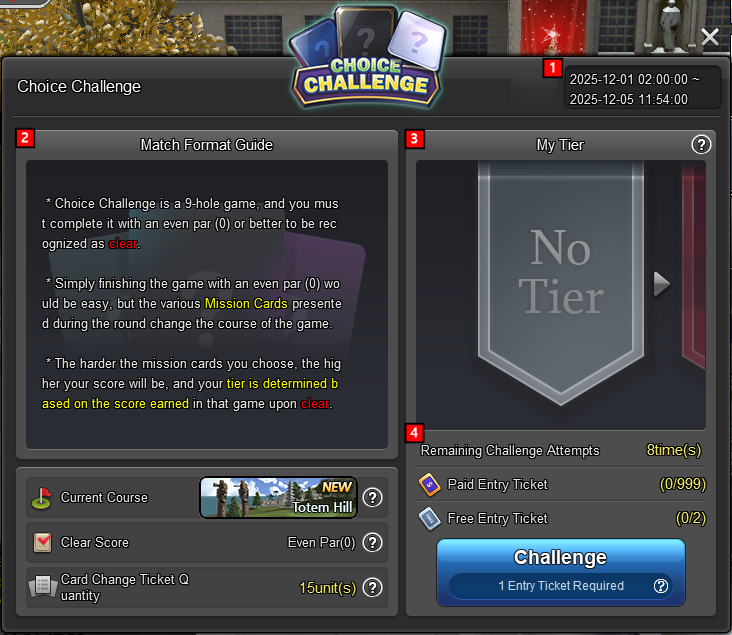
① Event Period
- You can check the duration of the season.
② Game Rules
- Displays the rules for Choice Challenge.
- You can check the course in play, clear strokes, and the number of Card Change Tickets you own.
③ My Tier
- “Tier” refers to the rank you earn based on the points obtained in a round.
- The higher the tier, the more options are added to the mission cards that appear.
- The “My Tier” section shows your current tier information.
- Click the arrow buttons to view previous or next tier details.
- If you haven’t achieved a tier, it will display [No Tier], and your tier will increase as you earn points.
- When your tier increases, click the [Tier Up] button to claim rewards.
- If the reward is linked to a previous tier, the previous tier reward will be deleted.
(Example: If you receive Choice Challenge Pre-Season Avatar Card [45%] and later obtain Choice Challenge Pre-Season Avatar Card [60%], the [45%] card will be removed.)
*Tier Up Available
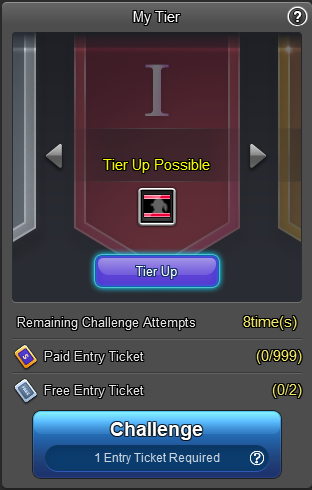 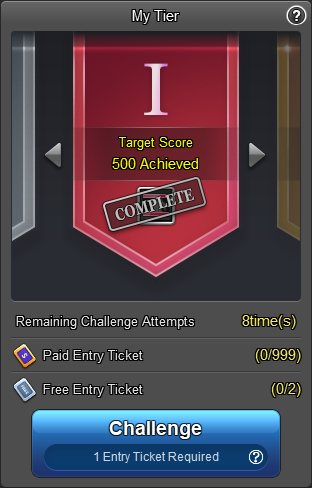
④ Remaining Challenge Attempts
- Indicates the number of times you can enter per week.
- Even if you have entry tickets left, you cannot enter beyond the remaining challenge attempts.
- Remaining attempts and free entry tickets are reset and updated every Wednesday at 00:00.
⑤ Entry Tickets
- Entry tickets are divided into Paid Tickets and Free Tickets.
- Paid tickets can be purchased from the Item Mall and you can hold up to 999 tickets.
- Paid tickets do not reset weekly; if a reset occurs, it will be announced separately.
- Paid tickets you own can only be checked on the entry information screen.
- Free tickets are distributed weekly, and the quantity varies depending on premium status.
- If you have both free and paid tickets, you can choose which ticket to use when entering.
- If premium status is applied after the reset time, the number of free tickets will not change immediately; it will be determined based on the reset time (Wednesday 00:00).
*The number of free entry tickets distributed may vary depending on the season.
◈ Choice Challenge Reward Information
- On the reward information screen, you can check the achievement conditions and rewards for each tier. You can also obtain or purchase a Card Change Ticket.
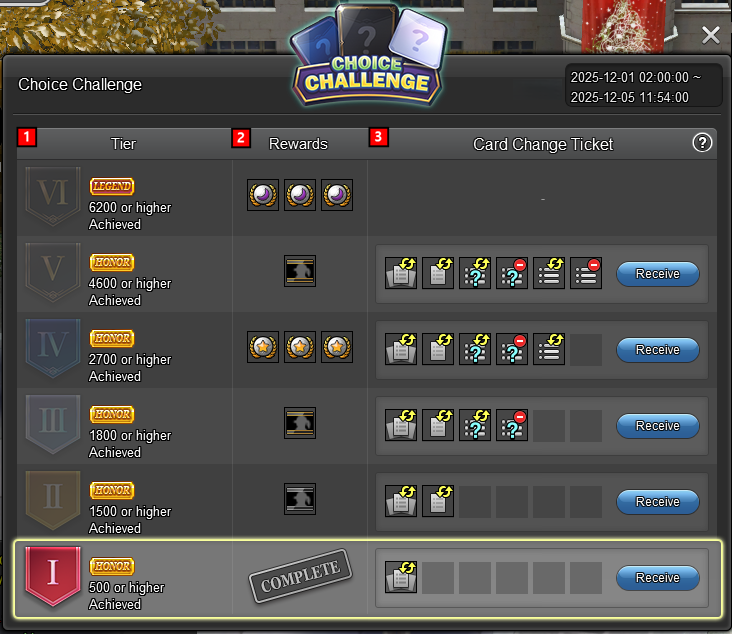
① Tier Information
- Here you can view the conditions required to reach each tier.
② Rewards
- Here you can find information about the rewards granted for each tier.
- Rewards for reaching a tier can only be used during the season and will be deleted at the end of the season.
*Detailed information about preseason rewards can be found in the “Rewards for Pre-Season Ranks” section.
③ Card Change Tickets
- Card Change Tickets are items that allow you to change mission cards or modify/remove options while playing.
- Depending on the tier you’ve reached, you can obtain Card Change Tickets once per week by clicking the [Receive] button.
- After claiming the free ticket, you can purchase additional tickets with NG by clicking the [Additional Purchase] button.
- The price of Card Change Tickets increases with the number of purchases.
◈ Flow of the Choice Challenge
- When you start the challenge, you select mission cards and play your round.
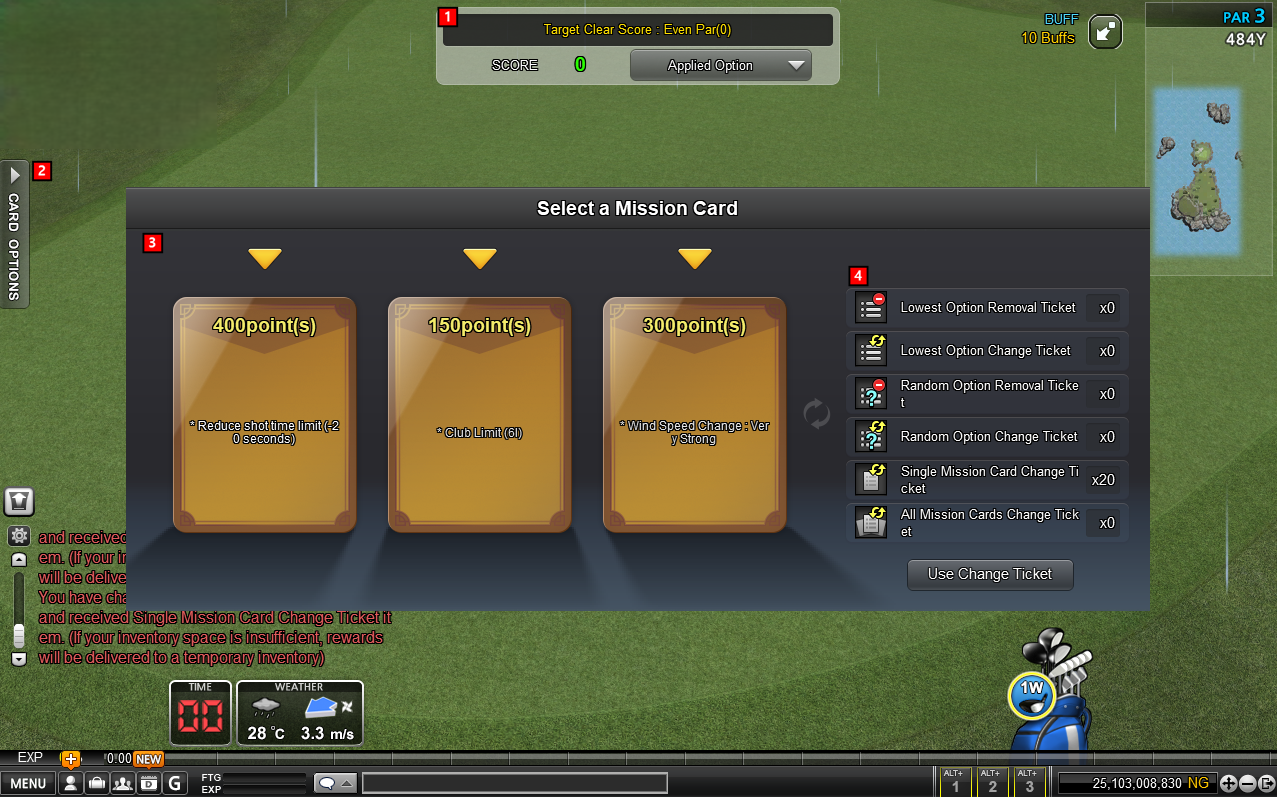
① Upper User Interface
- At the top of the screen, you can see the target stroke count, your current score, and the applied options.
- The target stroke count may change depending on the conditions of the selected mission cards.
- In the “Applied Options” menu, all selected and applied contents for the entire round are recorded.
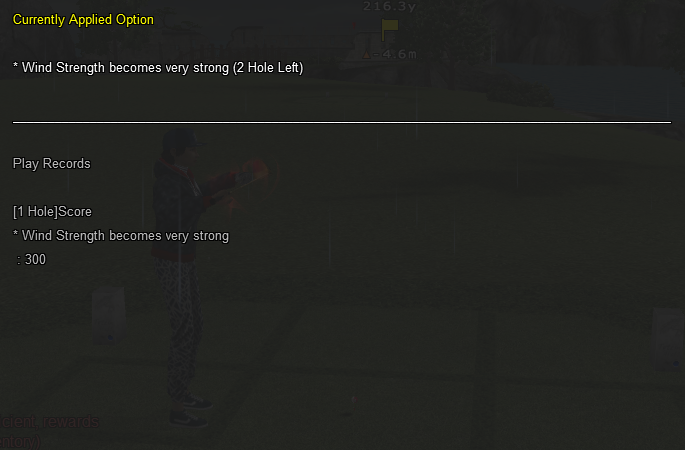
② Card Options
- This section displays the options of the currently applied card.
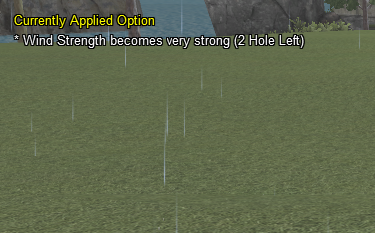
③ Mission Card Selection
- This area displays options that change the conditions of your round.
- When you hover over a card with your mouse or click it, you’ll see a more detailed explanation.
- Mission cards can have up to 5 options.
- A card’s score is calculated as the sum of the points assigned to its options.
- Options that make gameplay easier will reduce the score.
- The card’s color changes depending on its score.
When hovering over mission card
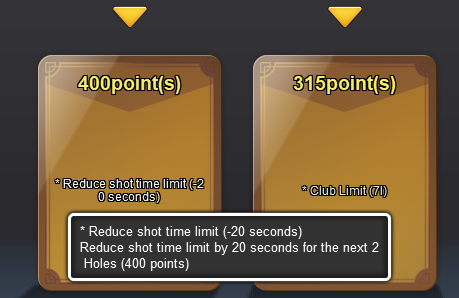 When selecting mission card 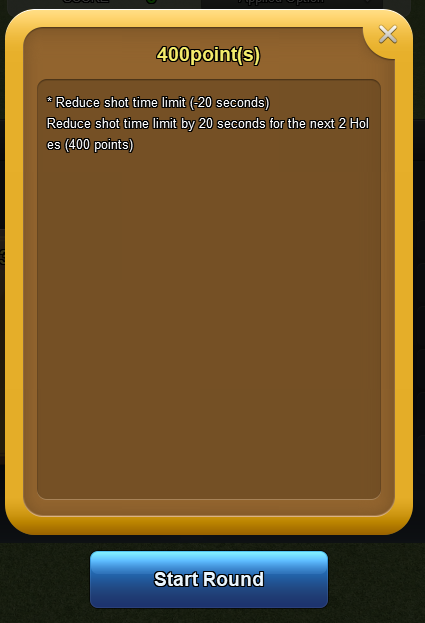
④ Card Change Tickets
- With a Card Change Ticket, you can remove or modify cards or options.
- When you remove or change options, the card’s score will be adjusted according to the total sum of its options.
◈ Using Card Change Tickets
① Click the [Use Change Ticket] button on the mission card selection screen.
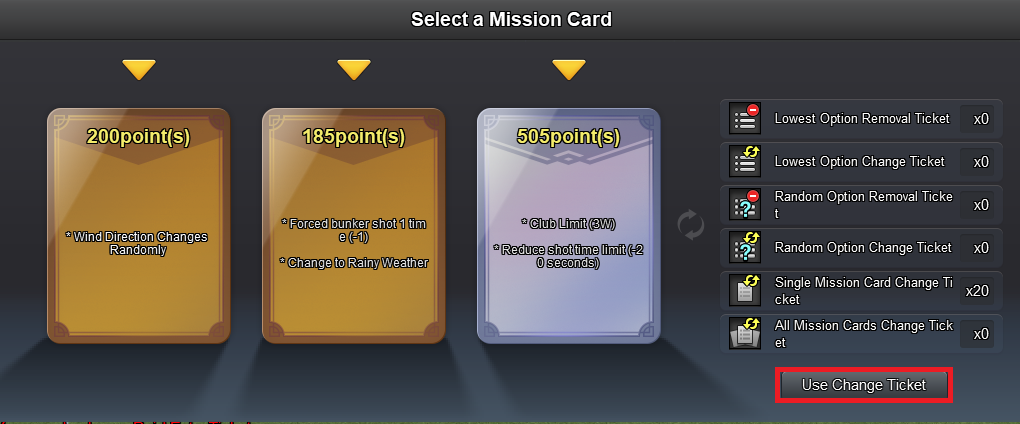 ② Select the Card Change Ticket you want to use. 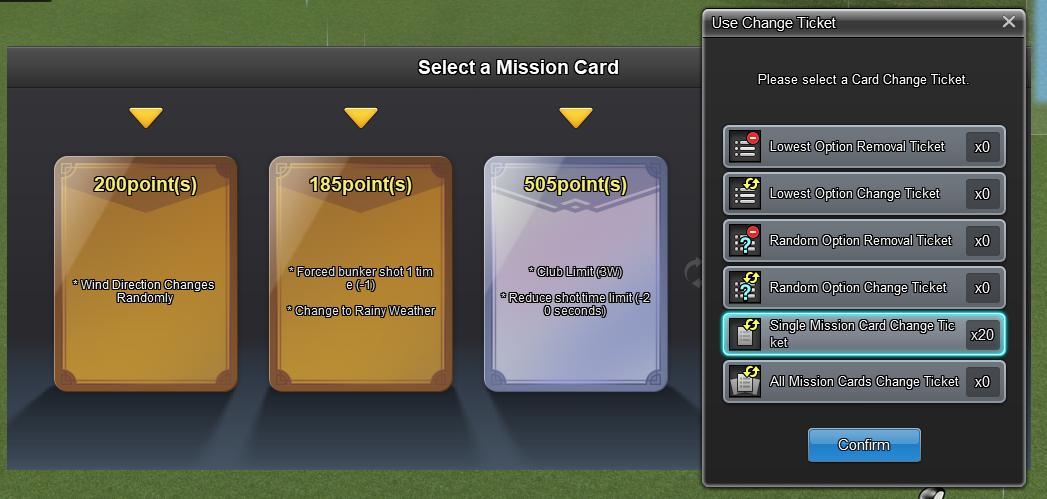 ③ For tickets that apply to specific cards, select the target card. 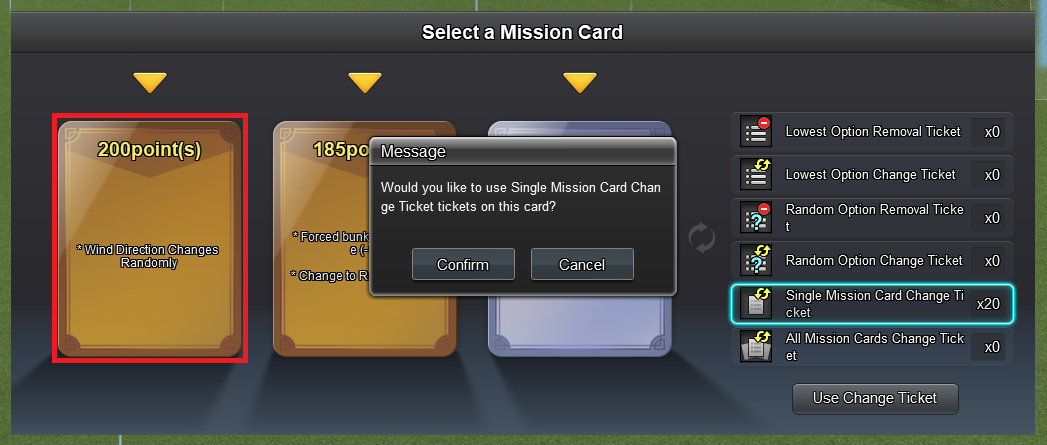 ④ Review the changes you have made. 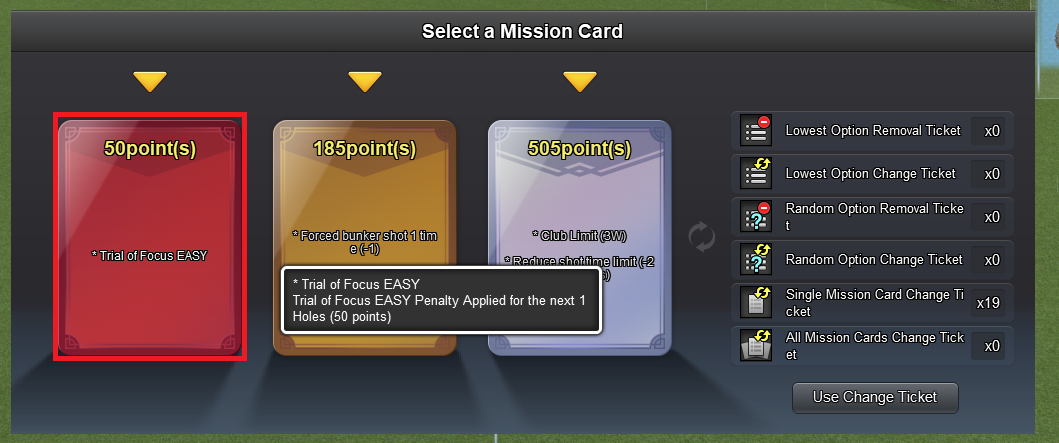 ◈ Rewards for Pre-Season Ranks
*All rewards are character-bound.
*Rewards can be used from the time they are obtained until the end of the season.
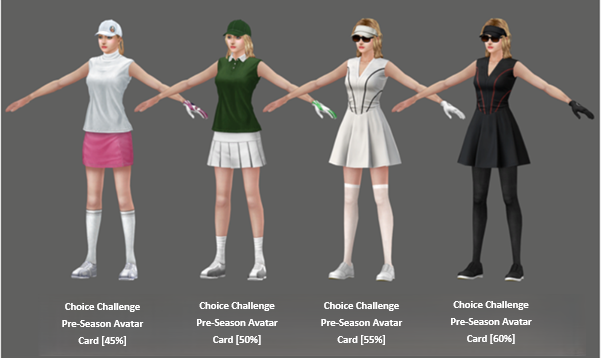
◈ Avatar Information
- The stats of the Choice Challenge Pre-Season Avatar are [Power: 3 | Impact: 3 | Skill: 20].
- After the season ends, the obtained avatars will be converted into items without stat or EXP effects.
◈ Pre-Season Round Reward Information
◈ Contents of the Event Box
*You can receive one of the above items.
*Box contents may change during the regular season.
*Material Jewel can be used as a crafting material in the Item Recipe under the “Business Trip” tab.
◈ Rewards at the End of the Pre-Season
*For rewards given at the end of the pre-season, the avatar awarded as a rank reward will be granted as a souvenir that you can keep permanently.
*When you use the souvenir, it will be registered in the avatar section.
We hope you enjoy the new game contents and updates coming with the December maintenance!
Your Shot Online Team |
|||||||||||||||||||||||||||||||||||||||||||||||||||||||||
-
NOTICE
07OCT
2026 -
NOTICE
27SEP
2026 -
NOTICE
22SEP
2026 -
NOTICE
22SEP
2026 -
NOTICE
22SEP
2026 -
NOTICE
21SEP
2026 -
NOTICE
20SEP
2026 -
NOTICE
27AUG
2026 -
NOTICE
25AUG
2026 -
NOTICE
23AUG
2026

