
Vallar
-
SOE-TEAM
S10
-
IGS
S10
-
-NoRulz-
S10
-
★Revolution★
S10
-
Q
S10
-
HarukaA
S10
-
PT
S10
-
3-Lions
S10
-
BandOfBrothers
S10
-
Les_Templiers
S10

| Subject |
[Update] Advanced Legend Clothes Potential System |
||||||||||||||||||||||||||||||||||||||
|---|---|---|---|---|---|---|---|---|---|---|---|---|---|---|---|---|---|---|---|---|---|---|---|---|---|---|---|---|---|---|---|---|---|---|---|---|---|---|---|
| Date | Dec 09, 2025 | Views | 456 | ||||||||||||||||||||||||||||||||||||
Dear, SOmmunity
We would like to give you a closer look at the new content coming with the December maintenance.
Please read this announcement carefully to make sure you have all the information.
↗️ Advanced Legend Clothes Potential Expansion & Option Change
⦁ A new system will be introduced that allows you to expand the EXP limit of the Legend options assigned to Advanced Legend Clothes.
* “Potential” refers to the maximum experience value that an Advanced Legend Clothes can reach. By expanding the potential, you can increase this limit.
◈ Example of Option Change Process After Potential Expansion
⦁ Since “Potential” refers to the upper limit, expanding potential does not immediately increase the experience value.
⦁ After expanding potential, the actual values up to the new limit will appear based on probability when you change options.
⦁ Options with expanded potential can only be changed through the Advanced Legend Clothes Potential Expansion menu.
⦁ When changing options, you can use special materials to lock certain course or performance options so they do not change.
✅ Advanced Legend Clothe Potential Expansion
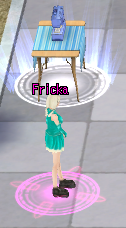
⦁ You can expand the potential of Advanced Legend Clothes through the [Expand Potential of Advanced Legend Clothes] menu located at the sewing machine above NPC Frika.
⦁ Only Advanced Legend Clothes can have their potential expanded, and an NG fee is required for expansion.
⦁ When expanding potential, the new value will appear between 8.5% and up to 13% of the maximum potential.
⦁ If the result is lower than the previous value, the potential will not change.
⦁ The fee increases based on the number of attempts to expand the selected option’s potential. This attempt count remains even if the Clothe is transferred or traded.
⦁ Clothes with expanded potential retain their expanded potential options even when moved to another character.
⦁ Expanding potential does not immediately apply the experience value; you must perform an option change for the new values to appear based on probability.
✅ Potential Display
⦁ Potential consists of the minimum and maximum values for additional experience gain that can appear on Advanced Legend Clothes.
However, when expanding potential, it is displayed based on the maximum value.
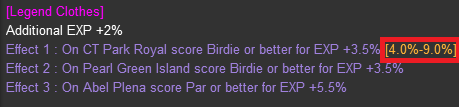
⦁ After potential expansion, the expanded potential value will be displayed in the clothes effect.
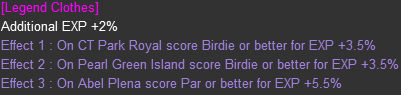
*Before Potential Expansion
*After Potential Expansion
✅ How to Perform Advanced Legend Clothes Potential Expansion
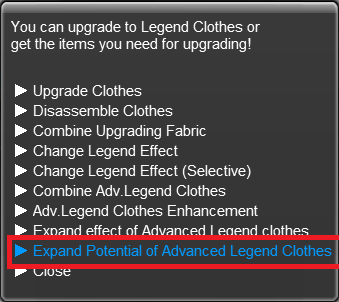
① Click the sewing machine located above NPC Frika and select the [Expand Potential of Advanced Legend Clothes] menu.
② Place the Advanced Legend Clothes you want to expand and click the [Expand] button for the option whose potential you want to increase.
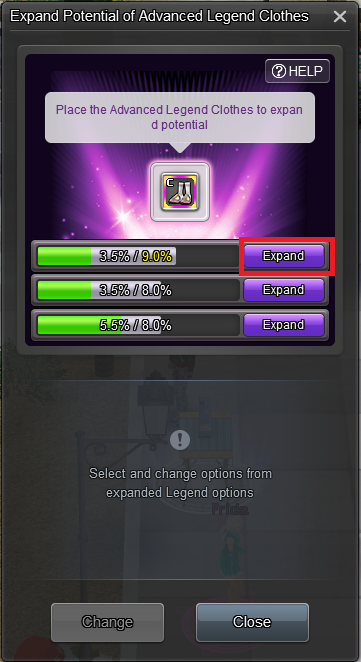
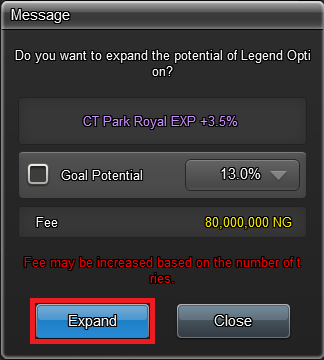
③ After confirming that the selected option is correct, click the Expand button.
* If you check the target potential and set a desired potential value, repeated expansion will be performed.
For details, please refer to the section [How to Perform Repeated Advanced Legend Clothes Potential Expansion] below.
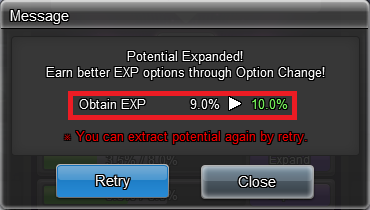
④ When potential expansion is complete, you can check the updated potential value. If you click the Retry button, you can attempt to change the potential value again.
* If the new potential value is lower than the previous one, the previous option will be retained.
✅ How to Perform Repeated Advanced Legend Clothes Potential Expansion
① On the potential expansion screen, check the target potential and select the desired potential value.
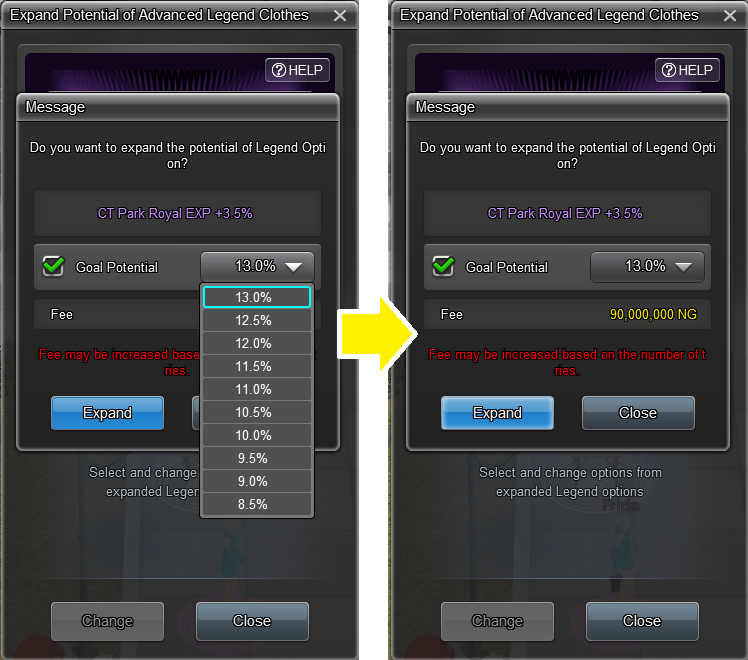
② After confirming that the target potential is correct, click the [Confirm] button. The expansion will repeat until the desired potential is reached.
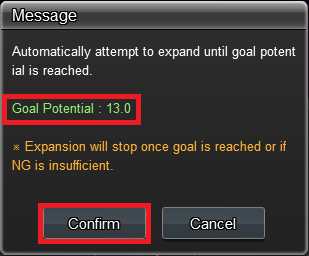
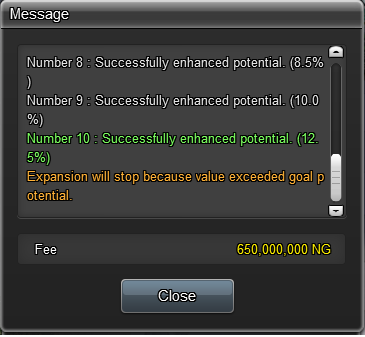
③ The results of the expansion attempts will be continuously updated.
* The process will automatically stop if the target potential or a higher option is reached, or if your NG balance is lower than the required fee.
* During automatic expansion, you can click the [Close] button to stop the repeated expansion. If you stop the process, the highest potential option achieved so far will be applied.
✅ How to Change Options After Potential Expansion
⦁ Options for Advanced Legend Clothes with expanded potential can be changed through the Expand Potential of Advanced Legend Clothes menu.
⦁ Legend Clothes Effect Ticket is required to change options.
⦁ You can lock course/performance options to prevent changes.
⦁ Locks require Ancient Red Sealing Stones or Ancient Blue Sealing Stones, depending on the option.
* Ancient Red/Blue Sealing Stones can be obtained from events or purchased from the Item Mall.
① Click the sewing machine to access the [Advanced Legend Clothes Potential Expansion] menu.
Register the clothes you want to adjust, then select the option you want to change.
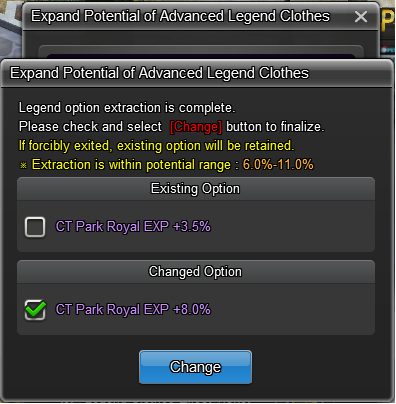
This shows the option change screen and the experience value range that may appear.
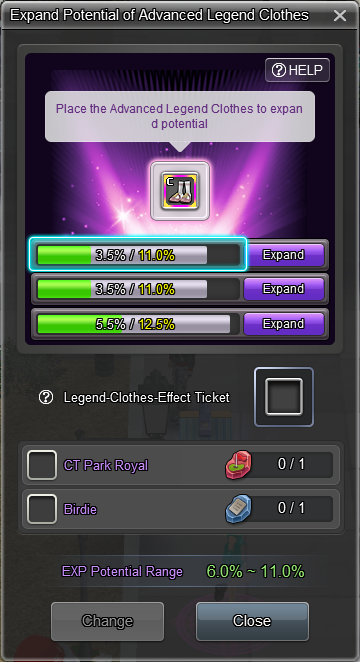
② Set locks if you do not want certain options to change, then register the ticket and click [Change].
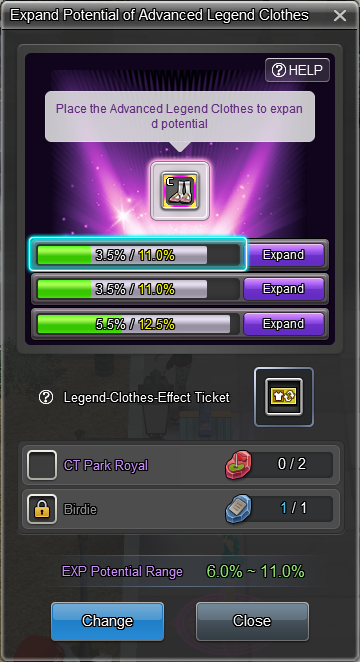
③ Review both old and new options. Select the one you want and click [Change].
We hope you enjoy the new game content and improvements from the December maintenance!
Your Shot Online Team |
|||||||||||||||||||||||||||||||||||||||
-
NOTICE
09DEC
2025 -
NOTICE
09DEC
2025 -
NOTICE
09DEC
2025 -
NOTICE
09DEC
2025 -
NOTICE
09DEC
2025 -
NOTICE
09DEC
2025 -
NOTICE
08DEC
2025 -
NOTICE
02DEC
2025 -
NOTICE
30NOV
2025 -
NOTICE
19NOV
2025


