
-
SOE-TEAM
S10
-
★Revolution★
S10
-
-NoRulz-
S10
-
PT
S10
-
CHN
S10
-
Q
S10
-
ShootingStars
S10
-
Hit&Hope
S10
-
Les-Demi-Dieux
S10
-
SoloRyders.UK
S10

-
What are my stats and what does each one do?
Shot-Online uses a stat system in order to upgrade your character's abilities. Each stat influences a different part of your game. There is a total of 4 stats: Power, Impact, Stamina and Skill.
Power- The amount of physical strength you have. Each power point will increase your carry distance on every club.
Impact- This is your ball control. Impact adds loft to your clubs and makes them less sensitive to mis-hits as well as making overpower shots more forgiving.
Stamina- Your resistance and hazard shots performance on the field. The more stamina you have, the less you get fatigued after your shots and the waiting period to decrease your FTG in the Square is shortened. This stat also regulates the power gaps when you hit shots from rough or from bunkers. With a higher stamina stat, the percentage interval is shortened, therefore making your shots (from rough or sand) travel more and be more consistent.
Skill- Skill determines the amount of spin you can apply to your ball. This will magnify your backspin, fade and draw effects adding more distance and curve to them.
You distribute your stats the way you want to, in order to build a character that reflects your style of play. -
Password retrieval
If you have lost or forgotten your password, please follow these steps password changes.
1. Make a new account
2. Send a D Q&A with this information.
- User id:
- First & last name:
- Date of birth:
- Registered email:
- Secret question & answer:
Once the information matches our records, we will generate a new password and reply it back to your email. -
Set Clothes Combining
Set Clothing Combination System
The Set Clothes Combining System is a new system that will allow players to trade in permanent versions of clothing to gain new clothes that have extra bonuses for using pieces of the same "Set". This system will be accessible through NPC Fricka, and will allow you to combine two of the same permanent clothes versions into one piece of "Set" clothing. Each piece (cap, pants, top, glove, shoes) can be combined in this way to complete your clothing "Set" and gain the extra bonuses that come along with them. The more pieces of the same set you wear, the more bonuses you gain!
So visit NPC Fricka and choose the new option available from her menu once you get two of the same new Spring 2012 clothing pieces as shown below.
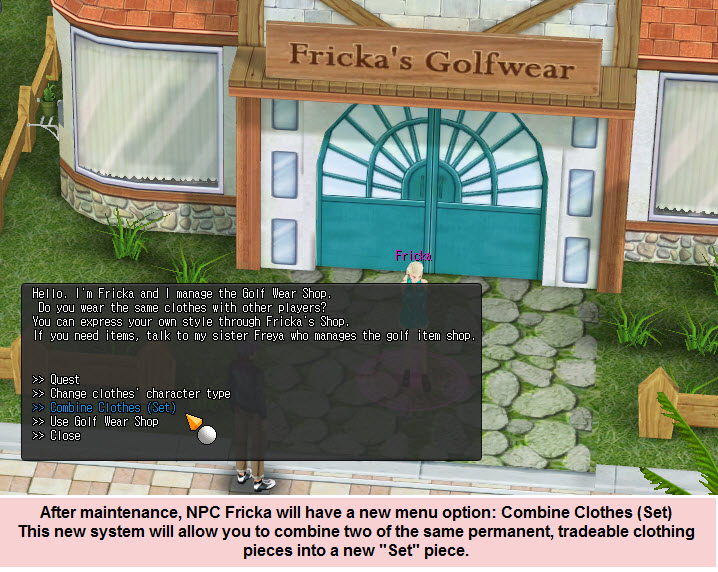
After selecting the option, a new window will appear allowing you to select and combine the clothes into a new "Set" clothing piece.
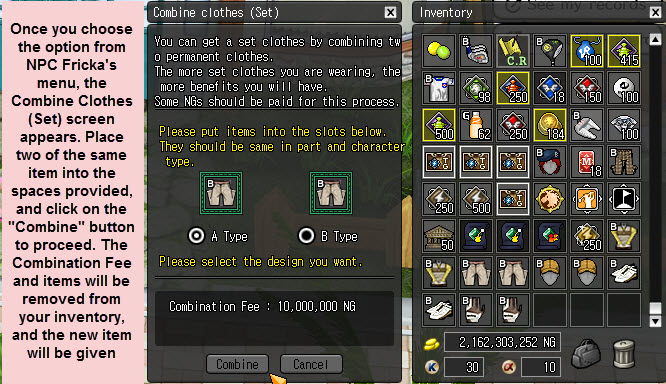
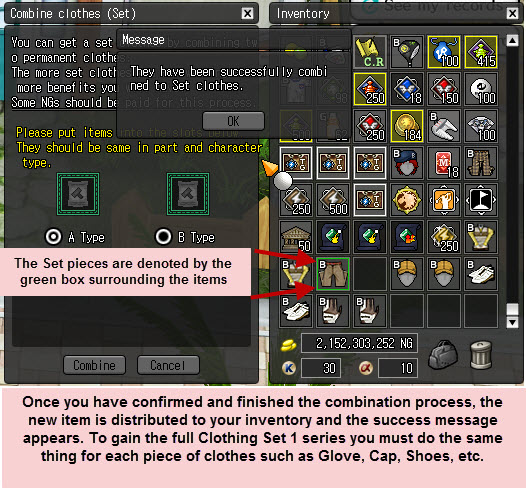
Once you have chosen and accepted the clothes to be combined, the process completes and you are given the new Set Clothes 1 piece depending on which clothing item you combined. Each clothing piece (cap, shoes, pants, etc) can be combined to make their "Set" version which has enhanced benefits on the item and also adds to your Set total to add more bonuses for wearing them all at the same time!
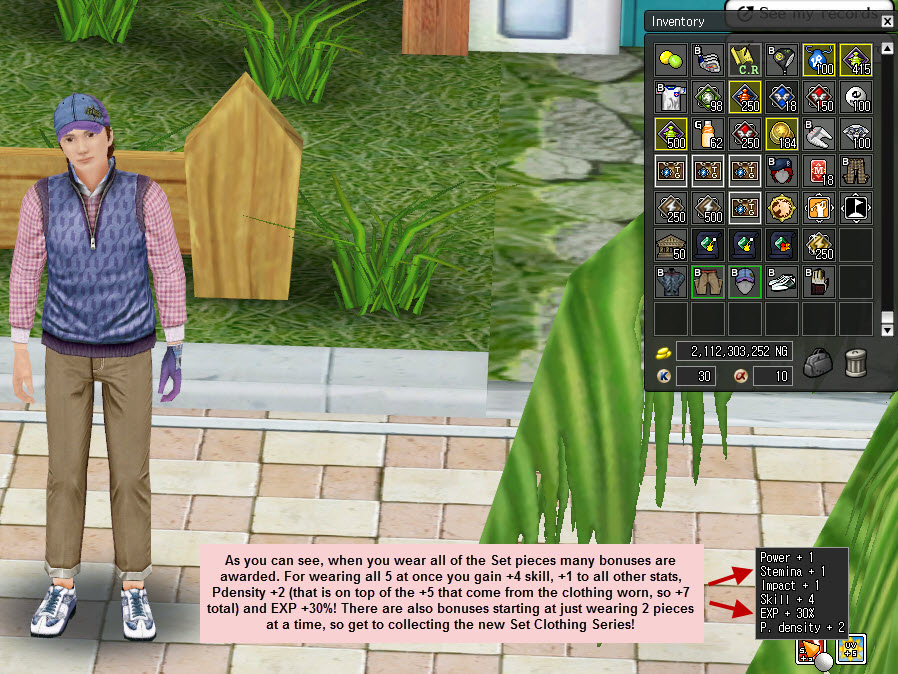
The more pieces of Set Clothes you wear, the better the bonuses get. For wearing 2 pieces you gain Skill Stat +1. For wearing 3, you gain another Skill Stat Point, so it changes to +2 bonus Skill. At 4 pieces you gain another Skill Stat Point which gives you +3 bonus Skill, an extra Practice Density Point, and also +10% Bonus EXP! To gain the best benefit though, you have to collect all of the pieces :)
NOTICE: Only the new Gorgeous clothing series and those introduced since will be usable with this system. So Tidy, Hiemal, Adaptable, etc clothing series from the past will NOT work with this system. Each new clothing series released including and after the Gorgeous series will be combineable with this system. Please note that the KP version is the only version that will come from combining clothing types; if you combine two IK versions you will get KP and if you combine PI and IK together you will still get KP. -
Changing password
If you want to change your password, please follow these steps.
1. Log into the website with your user id and password.
2. Click on your "My Account" link which is displayed under your Login ID and CC amount.
3. Enter your current password for security confirmation.
4. Click on the "Edit" button and proceed to change your information.
5. Click on submit to complete the password change process.
If you are having problems or would like us to change the password for you, please provide us with this information through DQ&A:
- User id:
- First & last name:
- Date of birth:
- Registered email:
- Secret question & answer:
- Desired password:
Once the information matches our records, we will change your password to your desired password.

